Core tenants applicable to all suppliers include #1 No PO No Pay and #2 Supplier Code of Conduct
No PO No Pay
- Definition: Invoices received from a supplier without an associated PO number will not be paid by Rivian
- Benefits: #1 Clear scopes of works for goods and services #2 Consistent process for payment #3 Reduced risk of fraud
Supplier Code of Conduct
- Definition: Statement of behaviors Rivian expects from suppliers.
- Benefits: Protect the Rivian brand by promoting trust, transparency, safety, and compliance within our supply chain
PO Review and Acceptance
Goods and Service performed against the purchase order will be viewed as acceptance of the PO terms
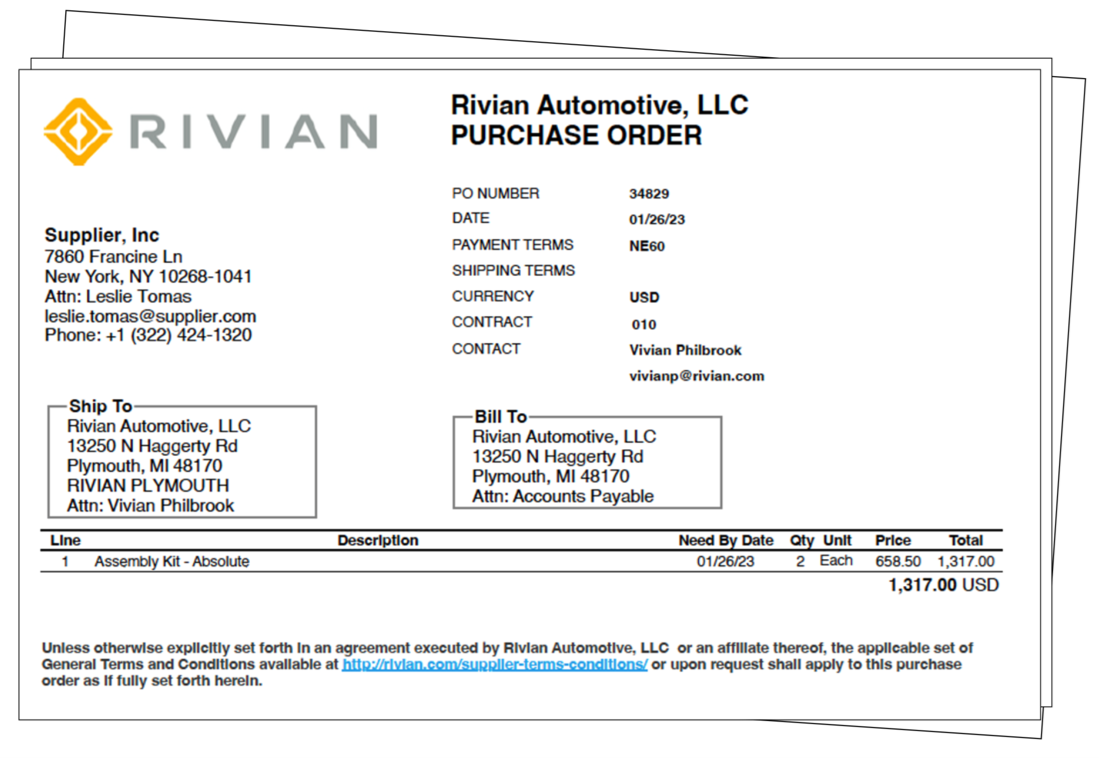
Please review details on the Purchase Order before acceptance and reach out to the Purchase Owner if any changes are required.
PO adjustments include but not limited to:
- PO assigned to the wrong supplier account (would result in a new PO#)
- Incorrect Net Terms
- Incorrect Currency
- Change of Scope
- Misc. Error
General Terms & Conditions
Applicable for the purchase of indirect goods and services (Indirect spend refers to procurement of goods and services not related to manufacturing. Indirect spend enables the business to maintain and develop internal operations)
The General Terms and Conditions of Purchase for Rivian Automotive, LLC (“Rivian”) apply to purchase orders as specified in the link below. Alternative terms or agreements apply only when formally recognized by Rivian in writing. If there is any question as to which set of General Terms and Conditions apply to your purchase order, please contact your Rivian representative for clarification.
Quote Requirement
All purchase order requests must include a valid quotation. Please ensure your quote includes the following information. Failing to do so many result in rejection of the quote and delaying the PO.
| Language | Kindly provide an English version of any non-English quotes to ensure PO accuracy |
| Currency | Specify the currency - required if not USD |
| Issue and Expiration Date | Please clearly define the issue date and expiration date |
| Payment Terms | Unless otherwise explicitly set forth in writing and agreed to by Rivian, all POs are under the standard terms of Net 60 |
| Rivian Contact/Requester | The Rivian contact or requester owning the purchase |
| Unit of Measure | Unit of measure of the line items |
| Ship-to Address | Please make sure the listed Ship-to Address is not mistaken with the Billing Address |
| Part Number / Manufacturing Number | Please provide the part# or manufacturing# if available |
| Itemize | If multiple items are on the quote, please separate them (e.g., breaking out labor and material) |
| Payment Scheduling | Payment Scheduling and terms |
PO Transmission Options
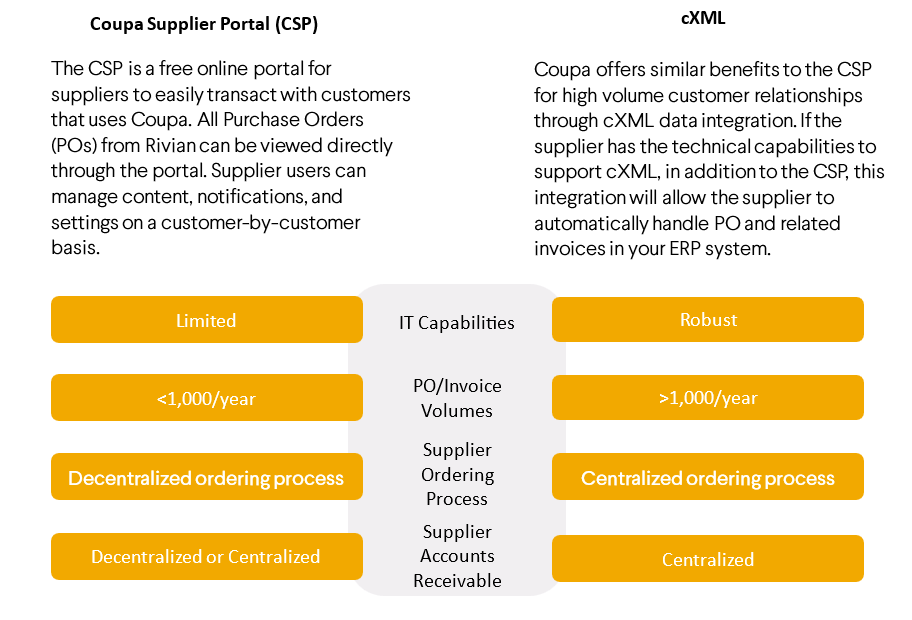
Depending on transaction volume and IT capabilities, there are two transmission options to choose from
Coupa’s free Catalog Management Solutions enable suppliers to showcase products to buyers in large organizations
When is a catalog appropriate?
- Rivian and Supplier are entering into a long-term, contracted relationship (multi-year)
- Defined product mix
- High transaction volume (10+ transactions per month)
- To request please reach out to your purchasing contact
What are the benefits?
- Increase Visibility: All catalogs are available on Rivian’s Coupa homepage, making them easily searchable and filterable
- Improve Order Accuracy: Purchasing directly from the catalog helps reduce order entry errors and eliminates inaccurate pricing
- Enhance Customer Relationships: Providing an efficient and streamlined purchasing experience helps build customer satisfaction and loyalty
- Improve Transaction Efficiency: Coupa catalogs can include pre-negotiated pricing along with visibility to details such as inventory level and estimated delivery time
HOSTED CATALOGS
Hosted Catalogs are loaded into Coupa so users can search for and add items to their cart directly. Catalogs are managed by suppliers through CSP.
Business Requirements
- Fixed pricing is in place.
- Supplier must invoice via CSP.
- Catalog maintenance is the responsibility of the supplier.
How it Works?
- Create your catalog using the Coupa catalog template (.csv).
- Upload though the Coupa Supplier Portal (CSP).
- Purchasing will approve/reject catalogs as they are submitted.
PUNCHOUT CATALOGS
Punchout Catalogs are integrated directly with the Coupa system, so users can shop on a supplier's website, add items to their cart, and be sent back to Coupa.
Business Requirements
- Fixed pricing is in place.
- Supplier must have cXML capabilities and invoice via CXML or CSP.
- Catalog maintenance is the responsibility of the supplier.
How it Works?
- Company logo.
- Punchout URL.
- Supplier domain and identity.
- Shared Secret.